



1. High-speed microSD Card
The Steam Deck supports expandable storage via a UHS-I microSD card, making it an essential accessory for gamers who need more space for their growing game libraries.
Why a UHS-I A2?
- The A2 rating ensures faster app performance, which is important for loading games directly from the card;
- Higher capacities like 256GB or 512GB are ideal for large AAA titles and game collections.
Recommended Brands:
- SanDisk Extreme: Known for speed and reliability;
- Samsung Evo Plus: A budget-friendly option with great performance.
When using a microSD card, it’s worth noting that installing games on internal storage may slightly improve load times, but a high-quality microSD card can handle most demands without noticeable lag.
2. USB-C Hubs for Steam Deck
A USB-C hub turns your Steam Deck into a more versatile gaming and productivity device.
Key features to look for in a USB-C hub:
- HDMI port for connecting to external monitors or TVs;
- Ethernet port for a stable internet connection during online gaming;
- USB-A ports for keyboards, mice, and external storage.
While the official Steam Deck dock is a clean solution, it’s often overpriced and hard to find due to high demand. Instead, a USB-C hub offers the same functionality at a fraction of the cost, and it works for other devices like laptops or tablets.
Our Picks:
- Anker USB-C Hubs: Reliable and compact with multiple port options;
- HyperDrive 6-in-1 USB-C Hub: Perfect for gaming setups with HDMI, Ethernet, and USB ports.
3. Portable Chargers for Steam Deck
The Steam Deck’s portability is one of its best features, but its 40Wh battery can drain quickly during demanding gaming sessions. That’s where a high-quality portable charger comes in.
What to Look For in a Charger:
- Power Delivery (PD) Support: Ensures fast and efficient charging. Look for a charger with at least 45W output;
- Capacity: A charger with 20.000mAh or higher is ideal to fully recharge the Steam Deck at least once.
Recommended Brands:
- Omnicharge: Known for high-quality, versatile power banks that support laptops and gaming devices;
- Anker PowerCore+: Reliable and affordable with a solid build.
Avoid cheap, no-name chargers that may overheat or fail to charge efficiently. Investing in a reliable brand ensures your Steam Deck is safe from power surges and battery damage.
4. Monitors for Steam Deck
If you’re planning to connect your Steam Deck to an external monitor, the choice of monitor can significantly impact your experience.
Why Stick to 1080p?
The Steam Deck is optimized for gaming at 900p resolution with medium settings. Connecting it to a 1080p monitor ensures the best balance between performance and visuals without unnecessary strain on the device.
Features to Consider:
- Low Input Lag: Crucial for responsive gaming;
- Refresh Rate: A monitor with 60Hz is sufficient for the Steam Deck’s output;
- Compact Size: A 24-inch monitor is “portable” and ideal for 1080p gaming.
Recommended Monitors:
- AOC 24G2: Excellent color accuracy and low input lag at a budget price;
- BenQ EX2510S: A great all-around gaming monitor with vibrant visuals;
- Dell SE2422HX: Affordable and reliable for casual gaming.
For older games or retro emulation, even cheaper monitors with basic specs will suffice. Avoid 4K monitors unless you’re okay with significant scaling issues and performance drops.
5. Best Controllers for Steam Deck
The Steam Deck’s built-in controls are excellent, but for some games or when using an external monitor, an external controller can enhance the experience.
Here’s a breakdown of top controller options:
- Xbox Wireless Controller: A tried-and-tested favorite with wide compatibility and seamless pairing. Its ergonomic design and responsive buttons make it a top choice;
- PlayStation DualSense Controller: Offers advanced haptics and a premium feel, perfect for games supporting immersive feedback;
- Nintendo Switch Pro Controller: Lightweight and features great battery life, though button mapping may require customization;
- 8BitDo Pro 2: A retro-styled controller with modern features, including customizable buttons and profiles;
- Steam Controller: Though discontinued, it remains a niche favorite for custom mapping and unique touchpads.
Pro Tip: SteamOS natively supports controller remapping, allowing you to customize inputs for different games. Experiment with profiles to find what works best for you.
6. Protective Case and Screen Protector
Your Steam Deck is an investment, so keeping it protected is a no-brainer.
Protective Case
A high-quality protective case shields the Steam Deck from drops, scratches, and everyday wear. Look for:
- Durable Material: Silicone or hard-shell materials for impact resistance;
- Custom Fit: Ensure it wraps snugly around the device without obstructing buttons or vents;
- Extra Features: Cases with built-in stands or accessory compartments are even better.
Top Picks:
- JSAUX Carrying Case: Designed specifically for the Steam Deck with storage compartments for chargers and cables;
- TomToc Hard Shell Case: Lightweight, shockproof, and water-resistant.
Screen Protector
The Steam Deck’s 7-inch touchscreen is prone to scratches and fingerprints.
- Tempered Glass: Offers the best protection from scratches and drops while maintaining touch sensitivity;
- Anti-Glare Coating: Reduces reflections for better visibility in bright environments.
Recommended Brands:
- dbrand: Premium protectors with precise cuts;
- amFilm Tempered Glass: Affordable and easy to install.
7. Compact Wireless Keyboard and Mouse
For tasks like desktop mode or navigating PC-centric games, a compact wireless keyboard and mouse combo is invaluable.
Why Go Compact?
- Saves space in your setup or travel bag.
- Pairs seamlessly with the Steam Deck’s Bluetooth functionality.
Features to Look For:
- Rechargeable Batteries: Long-lasting and eco-friendly;
- Low Latency: For gaming or rapid input during multitasking.
Our Recommendations:
- Logitech K380 and Pebble Mouse Combo: Ultra-portable, reliable, and aesthetically pleasing;
- Razer Turret: A premium option with gaming-specific features and RGB lighting.
8. Low-Latency Headphones
Audio can make or break your gaming experience, and low-latency headphones ensure your sound is always in sync.
What to Look For:
- Bluetooth 5.0 or Higher: Ensures stable connectivity and reduced latency;
- Battery Life: Aim for 15+ hours to match long gaming sessions;
- Comfort: Lightweight designs with soft ear cushions for extended wear.
Recommended Models:
- SteelSeries Arctis Nova 7X: High-quality sound with a low-latency wireless dongle;
- Sony WH-1000XM5: Perfect for immersive gaming and noise cancellation;
- Razer Barracuda X: Budget-friendly with great audio quality.
If you prefer wired headphones, the Steam Deck’s 3.5mm headphone jack supports any standard model for zero latency.
9. Adjustable Stand
An adjustable stand elevates the Steam Deck to eye level, making it perfect for long gaming sessions or when paired with a monitor.
Why You Need One:
- Keeps your hands free for external controllers or keyboard use;
- Improves cooling by allowing better airflow;
- Makes desktop mode more comfortable to navigate.
Top Options:
- JSAUX Adjustable Stand: Specifically designed for the Steam Deck with anti-slip padding.
- Lamicall Tablet Stand: Sturdy, multi-angle adjustment, and compatible with other devices.
For added functionality, combine the stand with a USB-C hub for a complete dock-like experience.
10. Extra Controllers: Great for Multiplayer Gaming
The Steam Deck supports multiple controllers via Bluetooth, making it a great device for local multiplayer gaming.
Ideal for:
- Playing split-screen or co-op games like Rocket League and Cuphead;
- Connecting up to four controllers for group gaming sessions.
Recommended Controllers:
- Xbox Series X Controller: Plug-and-play compatibility with most games;
- 8BitDo SN30 Pro: Retro-style with excellent customization options;
- PlayStation DualSense: Ideal for modern games with adaptive triggers.
Having extra controllers ensures everyone can join in the fun without hassle.
11. Steam Gift Cards: Expand Your Library with Ease
Sometimes, choosing the next game is a challenge. A Steam Gift Card is the perfect solution for expanding your library at your pace.
Why Gift Cards Are Great:
- Allow you to buy games, DLCs, or in-game content directly from the Steam Store;
- Useful during seasonal sales for grabbing big titles at lower prices.
How to Redeem:
Simply enter the code on your Steam Deck or through the desktop app, and the funds will be added to your account balance.
Available in various denominations, gift cards are an excellent option for gifting or treating yourself to something new.
Final Thoughts
The Steam Deck is an exciting, powerful handheld console that opens up a world of gaming possibilities, and while the device itself is impressive, the right accessories can truly elevate the experience. From improving comfort and protection to enhancing gameplay and functionality, the accessories discussed are all essential for getting the most out of your Steam Deck. Here’s a recap of why each one matters:
- Protective Case and Screen Protector: These are crucial for ensuring your Steam Deck stays in top condition, free from scratches, drops, and everyday wear. The screen protector also prevents smudges and ensures your device remains pristine.
- USB-C Hub: The USB-C hub is a must-have for expanding connectivity options, allowing you to connect multiple devices, including HDMI, Ethernet, and USB accessories. It’s a practical alternative to the official dock, offering flexibility without the unnecessary bulk.
- Portable Chargers: Portable chargers are indispensable, particularly for longer gaming sessions or when you’re on the go. Choose one with enough power to quickly recharge your Steam Deck while you continue playing.
- Monitors: While the Steam Deck is designed to be portable, connecting it to an external monitor can enhance your gaming experience, especially when playing older games or engaging in emulation. Look for a monitor with 1080p resolution or below to avoid the hassle of upscaling and to maintain smooth gameplay.
- Controllers: With Bluetooth support, the Steam Deck works with a variety of controllers, including Xbox, PlayStation, and even Nintendo Switch controllers. It’s all about personal preference, but having a controller that feels comfortable will significantly enhance your gaming experience.
- Compact Wireless Keyboard and Mouse: For when you use the Steam Deck in desktop mode, having a compact wireless keyboard and mouse can make navigation and typing much easier, providing a more traditional PC-like experience.
- Low-Latency Headphones: Low-latency headphones are a great addition to ensure you experience immersive audio without any delay. Whether you’re gaming or watching content, good audio will make all the difference.
- Adjustable Stand: The adjustable stand is perfect for tabletop gaming, allowing you to set the Steam Deck at the ideal angle for comfort. It also helps with cooling during extended sessions.
- Extra Controllers: If you plan on playing multiplayer games, having extra controllers is a necessity. Nothing beats the fun of local co-op gaming, and having backups ensures you’re always ready for friends or family to join in.
- Steam Gift Cards: For expanding your game library or grabbing discounts during sales, Steam Gift Cards are a convenient and simple way to add games to your collection.

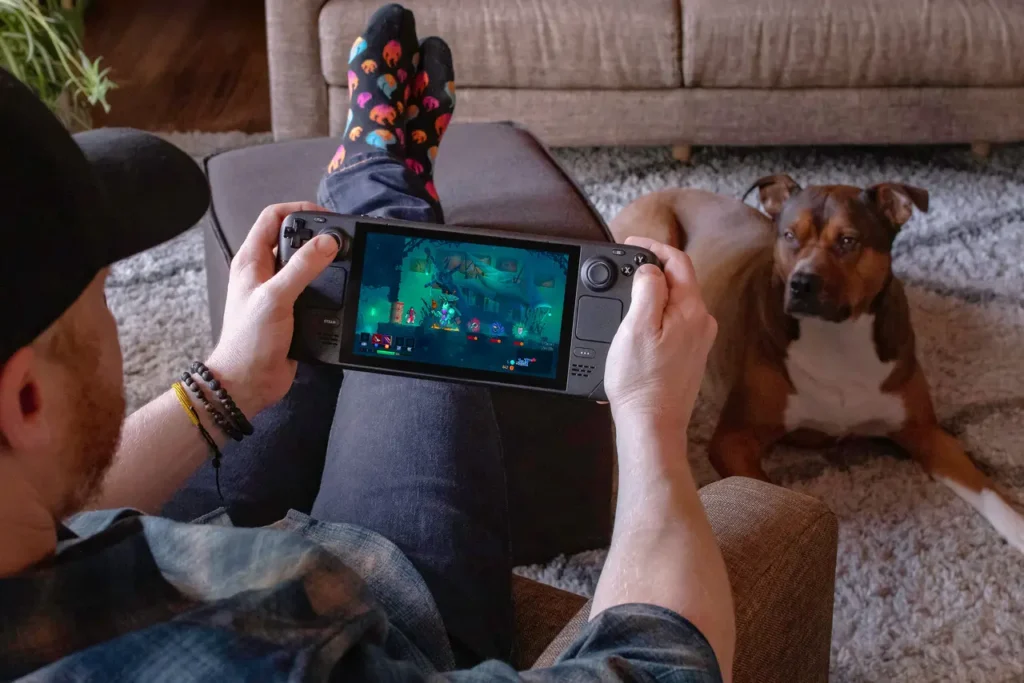
In conclusion, while the Steam Deck is already an impressive handheld device, these accessories can enhance usability, comfort, and gameplay. Whether you’re gaming at home or on the go, these additions make the device even more versatile and enjoyable. Investing in the right accessories is a surefire way to unlock the full potential of your Steam Deck and ensure you’re ready for any gaming challenge that comes your way.